Showing posts with label Timer Nodes. Show all posts

Wednesday, 26 February 2014

Trigger the Flow with TimerNode and Place Message to Queue

Step:1
Configure the properties of TimeroutNotification Node as below


Step:2
In JavaComputeNode we should create below processing logic

                        MbMessage inMessage = inAssembly.getMessage();
       MbMessageAssembly outAssembly = null;

// Create new message as a copy of the input to change the inassembly that is obtained from timer node

MbMessage outMessage = new MbMessage(inMessage);
outAssembly = new MbMessageAssembly(inAssembly, outMessage);
MbElement root=outAssembly.getMessage().getRootElement();
MbElement body=root.getFirstChild();

                        UUID uid=UUID.randomUUID();
String uuid=uid.toString().substring(0,24);

//Creating MQMD Header with below properties to Place message in to Queue

MbElement mqmd=body.createElementAfter("MQMD");
mqmd.createElementAsFirstChild(MbElement.TYPE_NAME_VALUE,"Version",Integer.parseInt("2"));
mqmd.createElementAsFirstChild(MbElement.TYPE_NAME_VALUE,"Format","MQSTR");
mqmd.createElementAsFirstChild(MbElement.TYPE_NAME_VALUE,"MsgId",uuid.getBytes());
//Creating message with MbElement.TYPE_NAME_VALUE for timer node will not work out here
//MbElement xmlnsc=root.createElementAsLastChild(MbElement.TYPE_NAME_VALUE,"XMLNSC",null);
//MbElement XMLROOT=xmlnsc.createElementAsFirstChild(MbElement.TYPE_NAME_VALUE,"TEST",null);
//XMLROOT.createElementAsFirstChild(MbElement.TYPE_NAME_VALUE,"Message","Success");

//Create message using MbXMLNSC.PARSER_NAME, MbXML.ELEMENT
MbElement xmlnsc=root.createElementAsLastChild(MbXMLNSC.PARSER_NAME);
MbElement XMLROOT=xmlnsc.createElementAsFirstChild(MbXML.ELEMENT,"TEST",null);
XMLROOT.createElementAsFirstChild(MbXML.ELEMENT,"Message","Success");

Step:3
Give Queue Name to the MQOutputNode


Thursday, 14 November 2013

Working with Timer Nodes

TIMER NODES PRESENT IN WMB ARE :
1.TIMER NOTIFICATION NODE,
2.TIMER CONTROL.

WE CAN USE TIMER NOTIFICATION NODE INDEPENDENTLY BUT WHEN WE USE TIMER CONTROL NODE  WE SHOULD USE TIMER NOTIFICATION NODE.

WE CAN USE  TIMER NOTIFICATION NODE WITH MULTIPLE TIMER CONTROL NODES.(i.e ONE  TIMER NOTIFICATION NODE AND ONE OR MORE TIMER CONTROL NODES.)

WHEN WE USE  TIMER NOTIFICATION WITH  TIMER CONTROL  "UNIQUE IDENTIFIER" SHOULD BE COMMON WHICH IS COMMON PROPERTY FOR TIMER NOTIFICATION AND  TIMER CONTROL NODES.

SAMPLE OF  TIMER NOTIFICATION SCENARIO
Properties for the nodes:-
MQInput,MQOutput  :-The properties for this nodes  are as usual.

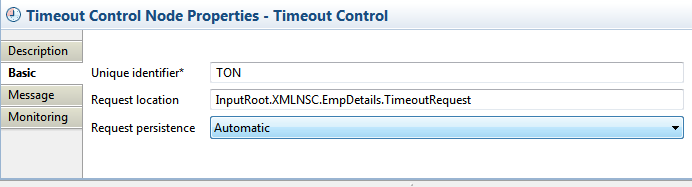
TimeOutControl:-
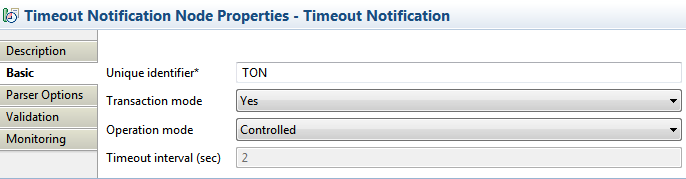
TimeOutNotification:-
Set the operation mode as controlled to establish a connection between TimeOutControl and TimeOutNotification.

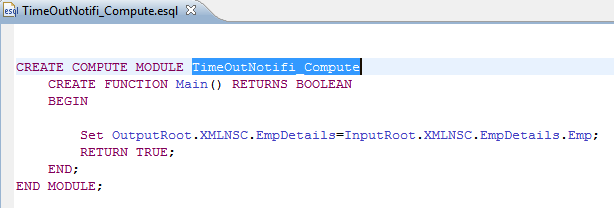
Compute Node:-

Input Message:-

<EmpDetails>
<TimeoutRequest>
 <Action>SET</Action>
 <Identifier>ThreeTimes</Identifier>
 <StartDate>TODAY</StartDate>
 <StartTime>NOW</StartTime>
 <Interval>5</Interval>
 <Count>3</Count>
 <IgnoreMissed>TRUE</IgnoreMissed>
 <AllowOverwrite>TRUE</AllowOverwrite>
</TimeoutRequest>
<Emp>
 <EmpName>EddieNorton</EmpName>
 <EmpID>9966</EmpID>
 <EmpAge>31</EmpAge>
 <EmpSex>M</EmpSex>
 <EmpDoj>05/26/1999</EmpDoj>
</Emp>
</EmpDetails>

This message can also be taken as the below but the main thing is that some of the tag names must be given with same tag names to make the Timer node to have its functionality in a proper way.
<EmpDetails>
<Emp>
 <Action>SET</Action>
 <Identifier>ThreeTimes</Identifier>
 <StartDate>TODAY</StartDate>
 <StartTime>NOW</StartTime>
 <Interval>5</Interval>
 <Count>3</Count>
 <IgnoreMissed>TRUE</IgnoreMissed>
 <AllowOverwrite>TRUE</AllowOverwrite>
 <EmpName>EddieNorton</EmpName>
 <EmpID>9966</EmpID>
 <EmpAge>31</EmpAge>
 <EmpSex>M</EmpSex>
 <EmpDoj>05/26/1999</EmpDoj>
</Emp>
</EmpDetails>
According to the above messages the message will be sent to the Output Queue for every  5 seconds and for 3 times.