Showing posts with label ESQL. Show all posts

Saturday, 10 September 2016

Time Conversions

CREATE COMPUTE MODULE TimeConvertion_Compute
    CREATE FUNCTION Main() RETURNS BOOLEAN
    BEGIN
       
        DECLARE now CHARACTER;
        DECLARE target TIMESTAMP;
        Declare SampleDate1 CHARACTER '2016-05-06T13:53:12.832Z';
        DECLARE DateFrmtpattern CHARACTER 'MM/dd/yyyy hh:mm';
        ---CHARACTER to DATE-----
        SET target = CAST(SUBSTRING(REPLACE(SampleDate1,'T',' ') BEFORE 'Z') AS TIMESTAMP);   
        SET now = CAST(target AS CHARACTER FORMAT DateFrmtpattern);
        SET OutputRoot.XMLNSC.Casting.Date1=now;
       
        SET now = CAST(CURRENT_TIMESTAMP AS CHARACTER FORMAT 'yyyyMMdd-HHmmss');
        SET OutputRoot.XMLNSC.Casting.Date2=now;
       
        --CHARACTER to DATE----
        DECLARE SampleDate2 CHARACTER '31-02-2016';
        DECLARE target1 DATE;
        DECLARE DateFrmtpattern1 CHARACTER 'dd-MM-yy';
        SET target1 = CAST(SampleDate2 AS DATE FORMAT DateFrmtpattern1);
        SET OutputRoot.XMLNSC.Casting.Date3=target1;

        ----DECIMAL to CHARACTER----
        DECLARE SampleDecimalChar DECIMAL 1562.189;
        DECLARE DecCast CHARACTER;
        DECLARE DecFrmtpattern CHARACTER '#,##0.00';
        SET DecCast = CAST(SampleDecimalChar AS CHARACTER FORMAT DecFrmtpattern);
        SET OutputRoot.XMLNSC.Casting.Decimal=DecCast;
       
        ---CHARACTER to TIMESTAMP---
        DECLARE SampleTS CHARACTER '17 Jan 16, 3:45pm';
        DECLARE ts TIMESTAMP;
        DECLARE TSpattern CHARACTER 'dd MMM yy, h:mma';
        SET ts = CAST(SampleTS AS TIMESTAMP FORMAT TSpattern);
        SET OutputRoot.XMLNSC.Casting.TimeStamp=DecCast;
       
        RETURN TRUE;
    END;

END MODULE;

Thursday, 18 August 2016

Modify Year In ESQL

Test Message:-
<dates>
<datemodify>
<date>31-01-2016</date>
<date>31-02-2016</date>
<date>31-03-2016</date>
<date>31-04-2016</date>
</datemodify>
</dates>


CREATE COMPUTE MODULE DateModify_Compute
 CREATE FUNCTION Main() RETURNS BOOLEAN
 BEGIN
  CALL DateModifyMove();
  -- CALL CopyMessageHeaders();
  -- CALL CopyEntireMessage();
  RETURN TRUE;
 END;

   CREATE PROCEDURE DateModifyWhile()BEGIN
   DECLARE I INTEGER 1;
   DECLARE COUNT INTEGER;
   DECLARE DATEREFIN REFERENCE TO InputRoot.XMLNSC.Dates.DateModify;
   SET COUNT=CARDINALITY(DATEREFIN.Date[]);
   WHILE I <= COUNT DO
    SET OutputRoot.XMLNSC.Dates.DateModify.Date[I]=REPLACE(DATEREFIN.Date[I],'2016','2017');
    SET I = I + 1;
   END WHILE;
   END;

CREATE PROCEDURE DateModifyMove()BEGIN
DECLARE DATEREFIN REFERENCE TO InputRoot.XMLNSC.Dates.DateModify.Date;
CREATE FIELD OutputRoot.XMLNSC.Dates.DateModify.Date;
DECLARE DATEREFOUT REFERENCE TO OutputRoot.XMLNSC.Dates.DateModify.Date;

WHILE LASTMOVE(DATEREFIN) DO
SET DATEREFOUT = REPLACE(DATEREFIN,'2016','2017');
CREATE NEXTSIBLING OF DATEREFOUT AS DATEREFOUT REPEAT;
MOVE DATEREFIN NEXTSIBLING REPEAT TYPE NAME;
END WHILE;
if LASTMOVE(DATEREFOUT) then
 DELETE LASTCHILD OF OutputRoot.XMLNSC.Dates.DateModify;
end if;
 END;

END MODULE;

Sunday, 1 November 2015

ESQL COMPUTE NODE CODING & STANDARDS

1.Declaration:
DECLARE i INTEGER 1;
DECLARE A CHARACTER 'software systems';
DECLARE i INTEGER CARDINALITY(someinput); // Gives total number of records in the input
DECLARE i INTEGER SUM(someinput);

2.Assigning a input reference to a variable or an assignment operation:
DECLARE inRef REFERENCE TO InputRoot.XMLNSC.DETAILS;
SET outRef.EMP[i].ENAME = inRef.EMP[i].ENAME;


3.Defining a while loop:
WHILE i <=  count  DO
  SET outRef.EMP[i].ENAME = inRef.EMP[i].ENAME;
  SET outRef.EMP[i].LOCATION = inRef.EMP[i].LOCATION;
  SET outRef.EMP[i].BATCH = inRef.EMP[i].BATCH;
  SET i = i + 1;
END WHILE;
4.Creating a xml Field:
CREATE FIELD OutputRoot.XMLNSC.DETAILS.EMP;

-Its always a best practise to use reference to the field created
DECLARE forOutRef REFERENCE TO OutputRoot.XMLNSC.DETAILS.EMP;

5.Creating a next sibling to a xml Field:
CREATE NEXTSIBLING OF forOutRef AS forOutRef
CREATE NEXTSIBLING OF OutputRoot.XMLNSC.Order.Summary.CustomerDetails
NAME 'Address';

6.Deleting a lastchild in a xml:
DELETE LASTCHILD OF OutputRoot.XMLNSC.DETAILS;

7.Creating a Procedure:
CREATE PROCEDURE  mapping (IN inputRef REFERENCE, INOUT inoutRef  REFERENCE )
BEGIN
  
  SET inoutRef.Designation = 'Senior Employee';
  SET inoutRef.Nationality = 'Indian';
  SET inoutRef.Company     = inputRef.COMPANY;
    
END;

8.Defining a for loop:
FOR forRef AS inRef.EMP[]  DO
  SET forOutRef.ENAME    = forRef.ENAME;
  SET forOutRef.LOCATION = forRef.LOCATION;
  SET forOutRef.BATCH    = forRef.BATCH;
        
-- Try to create procedures for reusable of  code.
  CALL mapping(forRef,forOutRef);
  CREATE NEXTSIBLING OF forOutRef AS forOutRef REPEAT;          
END FOR;

9.Defining a Row and Select Statement to access a row in xml:
DECLARE Record ROW;
SET Record.val[] =  SELECT A.BATCH  FROM  OutputRoot.XMLNSC.DETAILS.EMP[]AS A;
10.Casting:
CAST(A.BATCH AS INTEGER)
Cast(InputRoot.XMLNSC.Order.Items.Item[i].Price AS DECIMAL
CCSID InputRoot.MQMD.CodedCharSetId

11.Get the FieldNames and FieldValues from xml:
FIELDNAME(InputRoot.XMLNSC.DETAILS.EMP.ENAME);
FIELDVALUE(InputRoot.XMLNSC.DETAILS.EMP.ENAME);

12.Current Date:
CURRENT_DATE
CURRENT_TIME
CURRENT_TIMESTAMP

13.Switch Case:
-- Calculating the Tax based on state name --
CASE state
WHEN 'NJ' THEN
SET tax=(sum*7)/100;
WHEN 'NY' THEN
SET tax=(sum*9)/100;
WHEN 'CY' THEN
SET tax=(sum*8)/100;
WHEN 'TX' THEN
SET tax=0;
ELSE
SET tax=NULL;
END CASE;

14.Create CHILD With a name
CREATE FIRSTCHILD OF OutputRoot.XMLNSC.Order NAME 'Summary';

15.Create Attributes for Tag of XML
DECLARE ref2 REFERENCE TO OutputRoot.XMLNSC.Order.Summary.Address;
SET ref2.(XMLNSC.Attribute)ccode =ref3.CustomerID;
SET ref2.(XMLNSC.Attribute)State =state;
15.Functions:
LENGTH(A)
LCASE(A)
UCASE(A)
LEFT(A,2)
RIGHT(A,2)
TRIM(A)
SUBSTRING(A FROM 2 FOR 3)
POSITION('i' IN A)
LTRIM(A)
RTRIM(A)
OVERLAY(A PLACING 'ss' FROM 2 FOR 2)
REPLACE(A,'s','ssss')
REPLICATE(A,3)
TRANSLATE(A,'Bhanu','Address')

16.Sending the same data to multiple queues
   
SET OutputLocalEnvironment.Destination.MQ.DestinationData[1].queueName = 'Q3';    
SET OutputLocalEnvironment.Destination.MQ.DestinationData[2.queueName = 'Q4;    

17.Sending the data to another terminal without deleting the original data
   
PROPAGATE TO TERMINAL 'out1' DELETE NONE;


18.Calling External Java Class in ESQL :
CALL ADD() INTO A; -- Function call

CREATE PROCEDURE ADD ( IN A INTEGER,IN B INTEGER) RETURNS INTEGER
LANGUAGE JAVA
EXTERNAL NAME "com.training.add.Addition.Add";; -- CallMe is a methodName in JavaClass

Wednesday, 18 June 2014

Accessing Configurable Service using Java

Configurable Services are typically run time properties. We can use them to define properties that are related to external services on which the broker relies. Instead of defining properties on the node or message flow, we can create configurable services so that nodes and message flows can refer to them to find properties at run time. If we use this method, we can change the values of attributes for a configurable service on the broker, which then affects the behavior of a node or message flow without the need for redeployment.

1. Userdefined Configurable Service
2. Java Method
3. ESQL

Create a user defined configurable service
Go to Websphere MQ > Configurable Service > New > Configurable Service
Select type as Userdefined configurable service.
Add property in the GUI.
Or
You can use command to create Configurable service with Key and Value
mqsicreateconfigurableservice IB9NODE -c UserDefined -o UD1 -n
BHANU -v "2032" 

Java Class
To retrieve the Value from the configurable service we use a simple java call.
We need a ConfigurationManagerProxy jar file in our project workspace.

Version 1 :
package com.get.configvalue;
import com.ibm.broker.config.proxy.*;
public class GET_CONFIG_VALUE
{
public static String getValue(String strKey)
{
String strValue = null;
try{
BrokerProxy b = BrokerProxy.getLocalInstance();

while(!b.hasBeenPopulatedByBroker())
 {
}

ConfigurableService[] CS_set =b.getConfigurableServices("UserDefined");

strValue =CS_set[0].getProperties().getProperty(strKey);
}
catch (Exception e)
{
e.printStackTrace();
}
return strValue;
}
}


Version 2 :
package com.external.java;
import com.ibm.broker.config.proxy.*;
public class GetConfigProperty
{
public static String getValue(String ConfigService,String KeyValue)
{
String ResultValue = null;
try{
BrokerProxy b = BrokerProxy.getLocalInstance();

while(!b.hasBeenPopulatedByBroker()) 
{
}

ConfigurableService CS_set =b.getConfigurableService("UserDefined",ConfigService);

ResultValue = CS_set.getProperties().getProperty(KeyValue);
}
catch (Exception e)
{
e.printStackTrace();
}
return ResultValue;
}
}

ESQL

Version 1 :
Calling Java method in ESQL

CREATE PROCEDURE getValueFromConfig (IN KeyChar CHAR)
RETURNS CHAR
LANGUAGE JAVA
EXTERNAL NAME "com.get.configvalue.GET_CONFIG_VALUE.getValue";

getValueFromConfig : Procedure Name
KeyChar : Input Parameter
com.get.configvalue : Package Name
GET_CONFIG_VALUE : Java Class Name
getValue : Java Method

Calling ESQL procedure

DECLARE strKey CHARACTER 'BHANU';
--result will be stored in strValue

DECLARE strValue CHARACTER;
--retrieves the Value from configurable service properties

CALL getValueFromConfig(strKey) INTO strValue;
 -- (Key:BHANU Value : 2032)

CALL getValueFromConfig('SampleKey') INTO strValue;
 --(Key:SampleKey Value:SampleValue)

Version 2 :
Calling Java method in ESQL

CREATE PROCEDURE getValueFromConfig
(IN ConfigService CHARACTER,IN KeyValue CHARACTER)
RETURNS CHAR
LANGUAGE JAVA
EXTERNAL NAME "com.external.java.GetConfigProperty.getValue";

getValueFromConfig : Procedure Name
ConfigService : ConfigService Name
KeyValue : Key Value in Properties file
GetConfigProperty : Java Class Name
getValue : Java Method

Calling ESQL procedure

DECLARE strKey CHARACTER 'BHANU';
--result will be stored in strValue

DECLARE strValue CHARACTER;
--retrieves the Value from configurable service properties

CALL getValueFromConfig('UD1','BHANU') INTO strValue; 
--(Key:BHANU Value : 2032)

CALL getValueFromConfig('UD2','UD2') INTO strValue;
CALL getValueFromConfig('AD1','AD1') INTO strValue;


Tuesday, 6 May 2014

Working with HTTPNodes

Create Consumer and Provider Flows like
Consumer Flow:-
Properties  On Each Node of Consumer flow are given below
CSV_IN
Passing_Dept_Salary

esql in ComputeNode:-
CREATE COMPUTE MODULE Consumer_flow_Compute
      CREATE FUNCTION Main() RETURNS BOOLEAN
      BEGIN

            DECLARE DEPT CHARACTER;
            DECLARE SAL INTEGER;
           
            SET DEPT=InputRoot.MRM.DEPT;
            SET SAL=InputRoot.MRM.SAL;
     
            SET OutputLocalEnvironment.Destination.HTTP.QueryString.key =DEPT;
            SET OutputLocalEnvironment.Destination.HTTP.QueryString.key1 =SAL;
           
            SET OutputLocalEnvironment.Destination.HTTP.RequestURL='http://localhost:7080/getQueryString?';
                 
            RETURN TRUE;
      END;

END MODULE;

Request_Details
Just give a sample url to supress error at node like http://test.com


Result_Details
Provider Flow:-

Properties  On Each Node of Provider  flow are given below

Take_Dept_Salary
Retrieve_Details

esql in ComputeNode:-

CREATE COMPUTE MODULE Provider_flow_Compute
      CREATE FUNCTION Main() RETURNS BOOLEAN
      BEGIN

            DECLARE Dept_Sal_Location,SPLIT,DEPT CHARACTER;
            DECLARE SAL INTEGER;
            SET Dept_Sal_Location=InputRoot.HTTPInputHeader.[10];   
           
            SET SPLIT=SUBSTRING(Dept_Sal_Location AFTER '=');
            SET DEPT =SUBSTRING(SPLIT BEFORE '&');
            SET SAL  =SUBSTRING(SPLIT AFTER  '=');
           
      SET OutputRoot.XMLNSC.Employee.Details[]=PASSTHRU('SELECT * FROM mdeai.EMPLOYEE WHERE DEPT=? AND SALARY>?' TO Database.EmpTestDSN VALUES(DEPT,SAL));
                             
            RETURN TRUE;
      END;

END MODULE;


Provide_Respone

Input Message:-
EAI,10000

Create Message set for the Input Message with below details

DataBase records in the table

Tree Structure created with DataBase Details upon successful process

Message in Output Queue upon successful transaction is completed

Monday, 21 October 2013

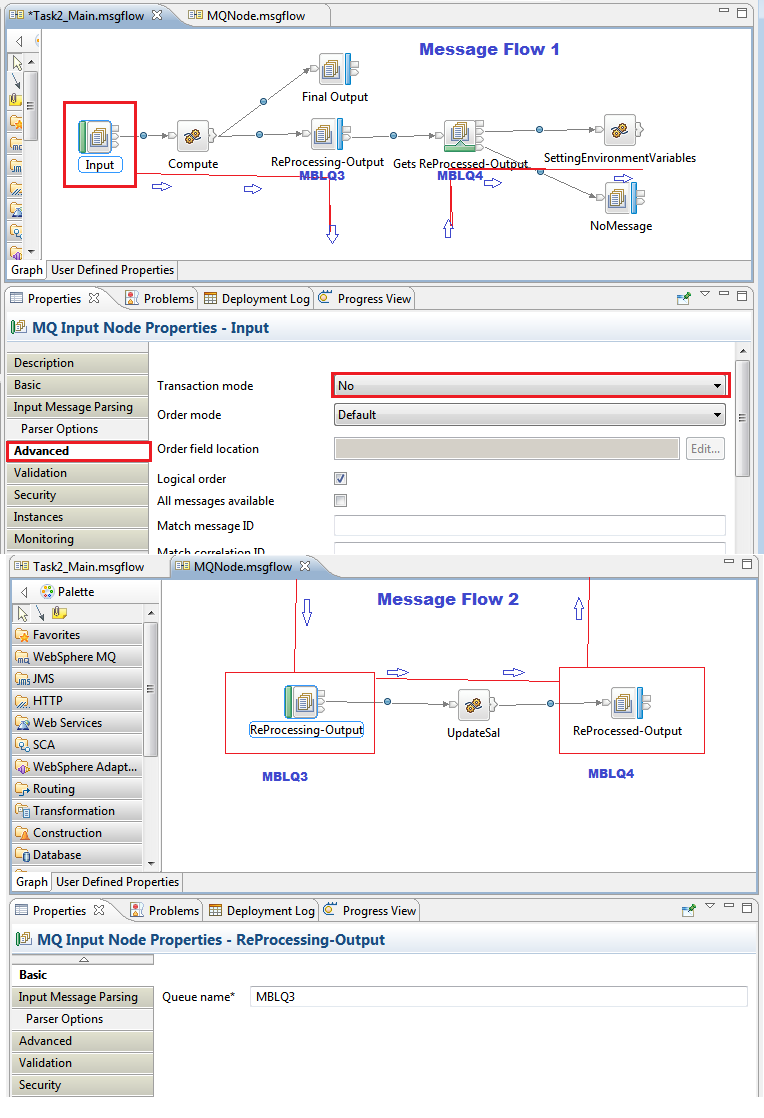
SCENARIO ON USAGE OF TRANSACTION MODE(sync -point),CORRELATIONID,ENVIRONMENT VARIABLES AND GET NODE


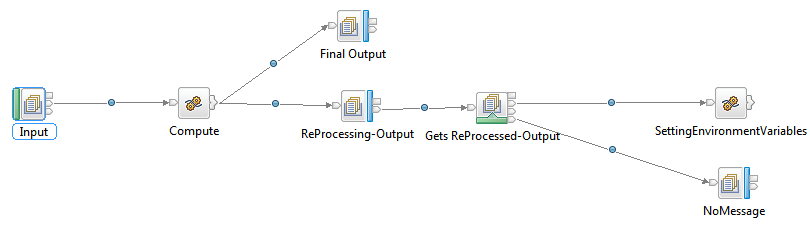
Message Flow 1(Main):


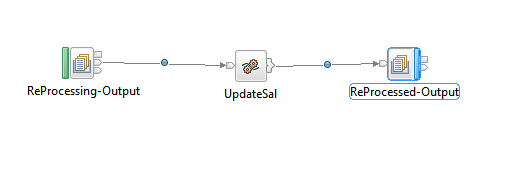
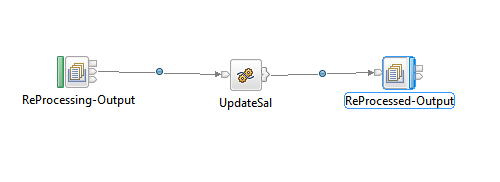
Message Flow 2(Sub):

INPUT:


(1)STANDARD INPUT INITIALIZATION:


DECLARE ptr REFERENCE to InputRoot.XMLNSC.EmployeeDetails.Employee[1];
DECLARE i INTEGER 1;

(2)MESSAGE FLOWS THROUGH ‘out1’ TERMINAL AND IN TURN LINKS TO MESSAGEFLOW 2(NOT SUBFLOW) BY HAVING SAME QUEUE NAMES TO FURTHER PROCESS THE STANDARD INPUT MESSAGE.
              

(3)RE-PROCESSING THE STANDARD INPUT.

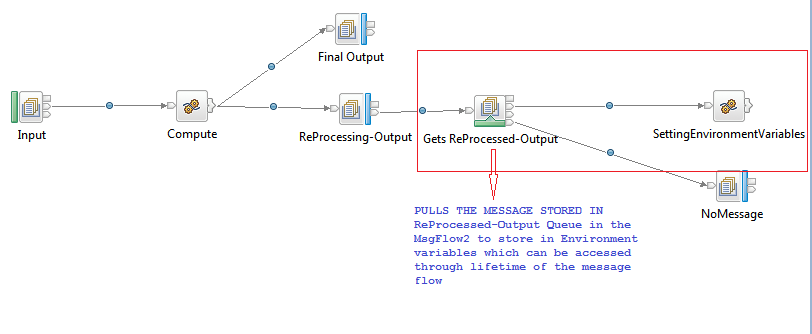
(4)GETS THE RE-PROCESSED INPUT (say,a+100) INTO GETNODE,WHOSE PURPOSE IS TO GET THE INPUT IN THE MIDDLE OF THE FLOW AND FINALLY SETS TO ENVIRONMENT VARIABLES.

CODE TO SET THE RE-PROCESSED INPUT TO ENVIRONMENT VARIABLES:

          CREATE FIELD Environment.EmployeeDetails;
     DECLARE envPtr REFERENCE to Environment.EmployeeDetails;
     CREATE LASTCHILD OF envPtr AS envPtr NAME 'Employee';
     set envPtr = InputRoot.XMLNSC.Employee;      
     RETURN TRUE;

-ONCE THE BOTH THE FLOWS END,THE OUTPUT MESSAGE CREATED IN ENVIRONMENT TREE WILL BE PROPAGATED TO OUT TERMINAL(Final Output Node in the first step).HERE THE POINT IS, JUST BECAUSE THESE ARE ENVIRONMENT VARIABLES,WE COULD EASILY ABLE TO RE-GET THE INPUT RE-PROCESSED MESSAGE IN TO THE OUTPUT STRUCTURE WITHOUT SCOPING THEM TILL NEXT NODE(localEnvironment) USING SET OutputRoot.XMLNSC=Environment;
USE OF TRANSACTION MODE:

BY PUTTING THE INPUT NODE ADVANCED PROPERTY,TRANSACTION MODE TO “NO” THE WHOLE FLOW WILL NOT BE TREATED AS A TRANSACTION AND WILL NOT TERMINATE EVEN THERE IS  SHIFT FROM Message Flow 1(Main) TO Message Flow 2(Sub) DUE TO SAME QUEUE NAMES.

EXCEPTION CASES : IF TRANSACTION MODE IS ‘YES’ then GETNODE(Gets ReProcessed-Output) Terminates through ‘No Message’ terminal and IF ‘Get by correlation ID’ is unchecked in request property of GETNODE.

IMPORTANT NOTE:-
When working with MQGET node for our surprise we observed that when the MQOutput node name and the MQGet node names are similar the message is appearing in the MQGet node Queue even though the Queue names configured to both the nodes are different.

MQGet node can be used anywhere in a message flow to store message temporarily.Using Compute node we copied the message id of the incoming message to correlation id of output message which helps to retrieve the temporarily message from the queue.
        By using the statement like SET OutputRoot.MQMD.CorrelId  =  InputRoot.MQMD.MsgId

This node name activity was a bug in this WMB V 8.0.0.1 this was being cleared when the same PI is being deployed in the IIB9 it was generating the error if any two nodes have the similar name with in the flow.

Saturday, 8 June 2013

DataBase Interaction Uses PASSTHRU statement in Compute Node

The main use of the PASSTHRU statement is to issue administrative commands to databases (for example, to create a table).

Note: Do not use PASSTHRU to call stored procedures; instead, use the CALL statement because PASSTHRU imposes limitations (you cannot use output parameters, for example).Uses specified ODBC data source Name.

- Only DDL Statements (CREATE, DROP , ALTER) requires PASSTHRU in a compute node.

Examples :

The following example creates the table Customers in schema Shop in database DSN1:

PASSTHRU 'CREATE TABLE Shop.Customers (
 CustomerNumber INTEGER,
 FirstName      VARCHAR(256),
 LastName       VARCHAR(256),
 Street         VARCHAR(256),
 City           VARCHAR(256),
 Country        VARCHAR(256)
)' TO Database.DSN1;

If, as in the last example, the ESQL statement is specified as a string literal, you must put single quotation marks around it. If, however, it is specified as a variable, omit the quotation marks.
For example:
SET myVar = 'SELECT * FROM user1.stocktable';
SET OutputRoot.XMLNS.Data[] = PASSTHRU(myVar);

The following example "drops" (that is, deletes) the table Customers from schema Shop in database DSN1:

PASSTHRU 'DROP TABLE Shop.Customers' TO Database.DSN1;