Thursday, 21 May 2015

IBM WebSphere MQ

An introduction to MQ :

In a nutshell, WebSphere MQ is an assured delivery mechanism, which consists of queues managed by Queue Managers for MB applications to Send/Receive Data or Messages. We can put messages onto, and retrieve messages from queues, and the movement of messages between queues is facilitated by components called Channels and Transmission Queues.

There are a number of fundamental points that we need to know about WebSphere MQ:
  • All objects in WebSphere MQ are case sensitive
  • We cannot read messages from a Remote Queue (only from a Local Queue)
  • We can only put a message onto a Local Queue (not a Remote Queue)

MQ queues :

MQ queues can be thought of as conduits to transport messages between Queue Managers.
There are four different types of MQ queues and one related object. The four different types of queues are: Local Queue (QL), Remote Queue (QR), Transmission Queue (TQ), and Dead Letter Queue, and the related object is a Channel (CH).

Let's take a high-level look at how messages are moved, as shown in the following diagram:
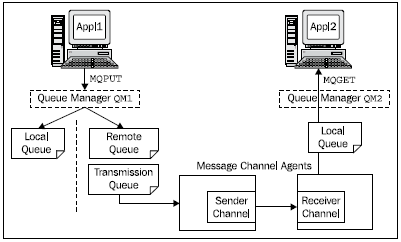


-When the application Appl1 wants to send a message to application Appl2, it opens a queue - the local Queue Manager (QM1) determines if it is a Local Queue or a Remote Queue. When Appl1 issues an MQPUT command to put a message onto the queue, then if the queue is local, the Queue Manager puts the message directly onto that queue. If the queue is a Remote Queue, then the Queue Manager puts the message onto a Transmission Queue.

-The Transmission Queue sends the message using the Sender Channel on QM1 to the Receiver Channel on the remote Queue Manager (QM2). The Receiver Channel puts the message onto a Local Queue on QM2. Appl2 issues a MQGET command to retrieve the message from this queue.


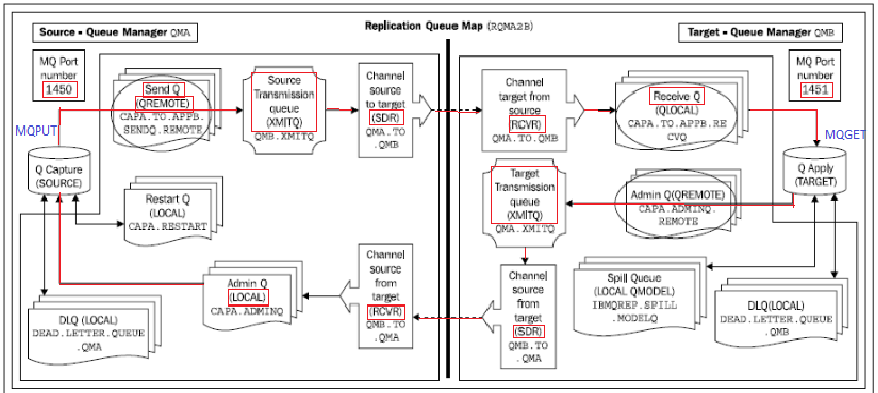
-Now let's move on to look at the queues used by Q replication and in particular, unidirectional replication, as shown in the following diagram. What we want to show here is the relationship between Remote Queues, Transmission Queues, Channels, and Local Queues. As an example, let's look at the path a message will take from Q Capture on QMA to Q Apply on QMB.


Friday, 17 April 2015

Differences between the transformation technologies in WMB and WTX

What are the overlaps and main differences between the transformation technologies in WMB and WTX?


There are some overlaps between transformation capabilities, but at their core, the two products have complementary strengths — WMB's being routing, WTX's being complex transformation


Message Broker is a platform for "enterprise-class data movement and message processing" building off the well proven capabilities of WebSphere MQ. WebSphere MQ is the industry-leading platform for assured transactional message delivery. On its own, it provides no capability to "manipulate" the content of messages, but in combination with WebSphere Message Broker, it offers very powerful capabilities. WMB is rich in detecting and distributing information based on message content, switching between protocols, refacing applications to perform and appear as Web services, providing high volume, high availability processing and more. It also has many different options for data transformation catering to different skill sets. While these data transformation capabilities are typically a class above those offered by other integration vendor's, WMB's focus has been mostly on the domain of small short messages.


WTX comes from a different background and has different strengths. Its heritage is the processing of large file structures, and in this area, it is particularly rich. It can provide complex data transformation capabilities for all and any structured and semi-structured data formats (including "mixed" types). Furthermore, WTX is better suited to handling "custom" tagged message formats or mixed tagged and binary. Finally, it is well suited for large file strucutures.


Combined, WTX and WMB provide a truly winning combination that is unique in the market in its breadth and depth.


Why not include WTXMB as integral component of WMB?


IBM prefers to give customers choice by providing a range of packaging options allowing the start simple and grow as and when required.


MB COMPONENTS :


  • Message Flow : A message flow is a sequence of processing steps that run in the broker when an input message is received.


  • Message Set   :  A message set is a container for grouping messages and associated message resources (elements, types, groups);COMPLEX TYPE CREATION .


  • Execution Group : A grouping of message flows that have been assigned to a broker.


  • Broker : A broker is a set of execution processes or groups that hosts one or more message flows to route, transform, and enrich in flight messages.


  • Broker Domain : A broker domain is one or more brokers that share a common configuration, together with the single Configuration Manager that controls them.


  • Configuration Manager : The Configuration Manager is the interface between the workbench and an executing set of brokers. It provides brokers with their initial configuration, and updates them with any subsequent changes. It maintains the broker domain configuration. It is the central runtime component that manages the components and resources that constitute the broker domain.
-  The Configuration Manager has four main functions:

  • Maintains configuration details in an internal repository. This repository provides a central record of the broker domain components.
  • Deploys the broker topology and message processing operations in response to actions initiated through the workbench. Broker archive (BAR) files are deployed through the Configuration Manager to the execution groups within a broker.
  • Reports on the results of deployment and the status of the broker.
  • Communicates with other components in the broker domain using WebSphere® MQ transport services.